

Thursday, December 16, 2010
Y.ahoo.it URL Shortening Bookmarklet
Read more »
Saturday, May 1, 2010
Chrome Extension For FarmVille

Read more »
Sunday, April 11, 2010
Web Builders And Bloggers Should Have These Firefox Extensions

If You Are A Blogger, Or A Professional Who Is Related With Website Building Or Maintaining, Then You Must Have These Extensions Installed On You Firefox Browser.
Read more »
Saturday, January 30, 2010
Firefox 3.6 Released, Its 20% Faster Than 3.5

Read more »
Friday, January 22, 2010
Google Wave Add-On For Firefox And Google Chrome

Mozilla Firefox
1. First Just Download The Add On For Google Wave From The Mozilla Website.
2. Once The Add-On Is Installed, You Need To Click On Tools >> Add Ons And Then Select The Options For Google Wave Notifier Add On.
3. Now Enter Your Gmail Username And Password. You Can Change The Refresh Time For The Add On To Check For New Updates.
4. The Updates Are Displayed At The Right Hand Bottom Corner Of The Browser. It As A Small Number Which Shows The Number Of Unread Waves. If You Hover Over It For A Few Seconds It Will Show A Show A Tiny Pop Up Of The Subject Line Of The Wave.
Google Chrome:
1. Install Chrome Extension For Google Wave Notification From The Extensions Library. (Chrome Browser Needs To Be A Beta Version)
2. Now Once The Extension Is Installed It Works Automatically And Gives Notification To The Number Of Waves Unread As Long As Your Were Signed Into Google Account.
3. The Notification Part Is Like The Firefox Add-On Neatly Packed Away And Visible Next To The Address Bar On Chrome.
4. The Updates Are Displayed As Numbers. If You Single Click On The Extension Symbol For Wave, It Pulls Up A List Of New Unread Waves. Click On One Of Them Takes Your Directly To The New Wave.
Links: Google Chrome Extension, Firefox Add-On
alsoread: Goo.gl Shortening Extension For Chrome
Thursday, July 2, 2009
Auto Pager Extension For Firefox

For Example:- By Default My 1001-Tricks Blog Shows Only The Latest 10-12 Posts On The Home Page. After Reading These Posts Then You Will Have To Click Older Posts To See The Next 12 Posts. But With The Help Of Autopager You Will Not Have To Click on Older Posts, ie, When You Reach The End Of The Page Autopager Will Make A Breakpoint And Shows The Next Page In Short.
Tuesday, June 30, 2009
Download Firefox 3.5

See What Firefox Team Has To Say On It
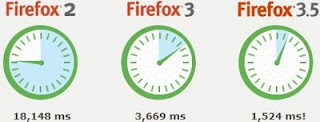
Things move quickly online, and we’ve beefed up the engine that runs Firefox to make sure you can keep up: Firefox 3.5 is more than twice as fast as Firefox 3, and ten times as fast as Firefox 2.* As a result, Web applications like email, photo sites and your favorite social networks will feel snappier and more responsive.View Performance Features
Sunday, June 7, 2009
TwitterFox For Firefox

Saturday, June 6, 2009
Recommended Web Browsers For Your Mobile Device
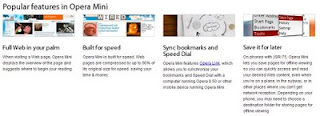
Opera Mini Is A Powerful Browser For Your Mobile Phone. I Guarantee You That This Browser Can Provide You Maximum Output That Any Other.

Teashark Is A Good Web Browser For Your Mobile Phone. Teashark Is Different With Its Simplicity And Performance.
UC Browser Is A Nice Web Browser For Your Device To Hank Out With, Its Stylish Look Gets Everyone Run After It.
Sunday, May 10, 2009
Watch Google Chrome's Ad On TV

Watch It , Its Really Interesting...
alsoread: How to remove advani's ad from your adsense
Thursday, May 7, 2009
Firefox Song

Read It:-
Hit it.
Dun, dun dun dun dundun
Ooo can ya hear me now?
Firefox in ya house
No more popups now
Get Get GetFirefox.com
Hey, Blake's in the House!
What up? Asa Now!
Get Get GetFirefox.com
We ain't stoppin now
50 mill downloads how
Get Get GetFirefox.com
Awww we got tab browsin' yo
an' Mitchell in volcanoes
We spread firefox like a dirty ho
Don' f'get t' use protection, tho
Get Get GetFirefox.com
Hollah!!! Stop.
Oh, you got it now
Fox_E_Mama in the house
You know it ain't stoppin now
Spreadin Firefox with 'er mouth
Unh, Unh, Get Get GetFirefox.com
Get Get GetFirefox.com
Word out.
I'm out mothefoxes!
Thursday, April 2, 2009
Yahoo! Mail Ad Removing
You Will Be Annoyed By The Yahoo! Ads Displayed On The Yahoo! Mail , If Wanna Remove These Ads From Your Yahoo Mail Box And View Your Mails Even Better Then This Post Will Help You A Lot.ads will look similar to this:-
Steps For Removing Yahoo! Mail Ads :-Requirements: Firefox Browser , Greasemonkey add-on
* Install Yahoo! Mail Cleaner User Script On Greasemonkey.
* Then Restart Your Browser
* Start Using Your Yahoo! Mail Without Ads...
Monday, March 23, 2009
Firefox Taking Too Much Time For Starting?
Then Here Is Your Solution.
Download Firefox Preloader And Let Your OS To Load It On Startup.
Firefox Preloader Loads Some Essential Parts Of Firefox Into The Memory Before The Browser Is Opened.
Also Read:
Do You Wanna Experience A Better Firefox
Saturday, March 21, 2009
Download IE8

Download Link:
http://www.microsoft.com/windows/internet-explorer/worldwide-sites.aspx
What's New In IE8:-
Web Slice:
This Is The One Of The Features Of IE8 , Which Impressed ME.
How many times a day do you check for updates to e-mail, weather reports, sports scores, stock quotes, auction items email and so on? Until now this was a manual process, where you had to repeatedly visit sites to check for updates or new information.
Using Web Slices, you can keep up with frequently updated sites directly from the new Favorites Bar. If a Web Slice is available on a page, a green Web Slices icon will appear in the upper-right hand corner of the browser. Click on this icon to easily subscribe and add the Web Slices to the Favorites Bar so you can keep track of that "slice" of the web.
A Web Slice on eBay
When new information becomes available, the Web Slice will become highlighted. When you click on the Web Slice in the Favorites Bar, it previews relevant information. Clicking on the preview takes you directly to the site for more information.
A Web Slice preview on the Favorites Bar
As with Accelerators, Microsoft has taken a platform-based approach to Web Slices, enabling virtually any developer to create them by merely adding a few lines of code to existing pages. For example, eBay has built a Web Slice that enables you to monitor an auction. Microsoft is working with partners to create more Web Slices, so, look for more Web Slices to become available on your favorite sites.
A number of great community and partner-developed Web Slices are available today. Choose the ones that work for you at the Internet Explorer Gallery.
Add a Web Slice to your Favorites Bar
Hover your mouse over an item on a webpage.
If that item incorporates Web Slice functionality, the Web Slice icon will appear. Click on the icon to add this "slice" of the web to your Favorites Bar. Now you can keep up to date with this information no matter where you are on the web.
To delete, right-click on your Web Slice and click Delete.
Friday, February 6, 2009
Have You Tried Cooliris On Firefox ?

Cooliris Is A Firefox Add-on Which Enables You To Search Pictures And Videos In A 3D Interface
* For Adding Cooliris To Your Firefox Browser Click Here Or Visit http://cooliris.com

* Wishing You A 3D Searching Experience
http://1001-tricks.blogspot.com
Thursday, February 5, 2009
Do You Wanna Experience A Better Firefox

The Default Optimization Settings Of FireFox Is Not The Best Which Firefox Can Do , You Have To Change Your Optimization Manually To See Your Firefox Performs Better , But Its Very Time Consuming And Will Be Difficult For Users Like Me :) , So Here Is A Firefox Add-on Which Is Based On A Collection Of Popular And Well Working Optimization Settings Used And Tested By The Experts .
Download FireTune For Firefox