Search This Blog

Showing posts with label Computer. Show all posts

Saturday, January 16, 2010

My New Netbook - Asus Eee PC 1000HD

1000HD eeepc
I Have Bought A New Netbook, Asus Eee PC 1000HD, Its A 10' Inch Netbook Which You Can Carry Easily.
Asus Eee PC 1000HD Has A Good Configuration And A Fair Price, Which Is About 15000 Indian Rupees. I Like My Eee PC Because It Could Be Carried Anywhere, Its Easy To Carry To My Collage For Having Some Notes And Accessing Wifi, And In My Hostel Its Not Just My Netbook, Its Everyone's Mate, Everyone Loves My Eee PC.
Here Is Some Quick Configuration Details:
Specifications (Base Version)
Manufacturer
Asus
Model Name
Eee PC 1000HD
CPU Type
Celeron-M
CPU Speed
900 Mhz
Graphics
Intel GMA 950
OS
Windows XP (Or Linux Xandros)
Display Size
10.2" 1024 X 600
RAM
1024 MB
Hard Disk
160 GB
Keyboard
YES
Mouse Pointer
YES
Battery Capacity
48 (Wh)
Weight
1446gm / 51 oz.
Size (w/h/d mm)
267/191/38 mm
Size (w/h/d inches)
10.5/7.5/1.5

Physical Interfaces
Ethernet 10/100
Line-out / Headphone (3.5mm)
MIC-in
Multi-format card reader
USB2.0 (x3)
VGA

Wireless Interfaces
802.11b/g
802.11n
802.11b/g
BT2.0

Additional Specs and Accessorie
WebCam 1.3Mp

Watch The Video Review Of Asus Eee PC 1000HD

alsoread: My iMate Ultime 6150

Saturday, October 31, 2009

Have A Look At The New HP Touchsmart PC

touchsmart-pc/

HP Have Developed A New PC Which Loves To Be Touched, HP TouchSmart PC. Its A Very Smart PC W/ A Wonderful Floating Screen.

Watch The Video On HP Touch Smart PC

Browse The Touch Smart PCs
alsoread: A PC Which Only Has A Giant Button

Wednesday, September 9, 2009

Have A Look At The Macbook Wheel

macbook-wheel
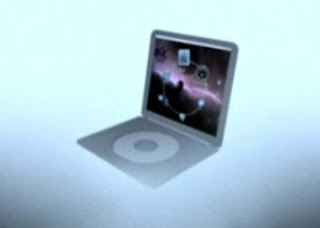
Apple Introduces A Revolutionary New Laptop Which Has No Keyboard, Mackbook Wheel. All It Has Is A Sleek Touch Sensitive Click Wheel & A Single Giant Button.

Watch The Video Review
Hats Off To TheOnion.Com


alsoread: Nokia Booklet 3G - Laptop From Nokia

Tuesday, September 8, 2009

Choose Netbooks For Comfortable Travels

netbook and notebook

Popularity Of Netbooks Is Growing Day By Day. Its A Very Productive Gadget To Have While You Are On A Tour Or If Your Are A Regular Traveler.

While Comparing To Notebooks W/ Netbooks, Netbooks Are Very Much Lighter And Smaller Than Notebooks, But It Still Allows Most Of The Functionalities Which You Could Expect From A Notebook. Watch The Video Of Frank Gruber On The Difference Between Netbooks And Notebooks.


Thanks To Kiesha Cochrane For The Useful Post.

alsoread: India's 10$ Laptop

Wednesday, September 2, 2009

Have A Look At The New Nokia Booklet 3G

nokia-bookletimg: nokia
Nokia Booklet 3G Is The New Mini Laptop PC From Nokia. Its A 10.1" Laptop That Offers 12 Hours Of Battery Life, HD Video Playback Support, Weights About 1.25 Kgs.

Videos On Nokia Booklet 3G


For More Videos, Visit Nokia Conversations Youtube Channel
It Runs Windows 7, Have Hard Disc Of 120 GB, 1 GB Ram, Intel Atom Processor, Supports WLan & WWan Connectivity.
Click Here For A Full Specification On Nokia Booklet 3G

Images Of Nokia Booklet 3G


nokia-booklet-Photosnokia booklet 3g


alsoread: Have A Look At The HTC Hero

Saturday, April 11, 2009

Turn Your Desktop Into 3D W/ BumpTop

bumptop logo

BumpTop is a fun, intuitive 3D desktop that keeps you organized and makes you more productive. Like a real desk, but better. - Bumptop.com


Look BumpTop In Acton On My Desktop
bumptop in action
Bump Top Works Great On Touch Screen Monitors , Watch BumpTop In Action Video:

The Main Difference In Bumptop As I Am Concerned Is Its Availability Of One Click Sharing Of Our Files On PC With The Social Websites Like Twitter And Facebook.
bumptop gets social
Download Bumptop

And Have A Look On Bumptop's Good Collection Of Themes.

Friday, February 20, 2009

Add Your Own Icon To The Drives

You Can Make Your Own Icon For Your Local Disk Drives , CD’s , Dvd’s , USB Pendrives , And So On…

Like This …

Autorun Icon

Procedure For Making An Autorun Icon :

*Open Your Drive

*Open Paint.exe , And Create A Suitable Image For Making An Icon ,

Like Your Face , Your Beloved One’s Face … , Then Re Size It To 95×95

(width x height) And Save The Image With The Extension name.ico (you can change “name” to what ever you like )

*Copy The Saved name.ico Image To Your Drive .

*Create A Text File (notepad) , And Open The NotePad File ,

And Type These Words

[autorun]

icon=name.ico

( Without “” , Remember : replace name.ico with your image’s name )

Then Save The Text File .

* Now Go To ” Tools -> Folder Options -> View

Then Uncheck “Hide Extensions For Known File Types”

Then Click Ok .

* Then Rename Your Text File ToAutorun.inf

* Done…

After Restarting Your System You Can Find Your Icon On Your Drive …

[:)] Keep Smiling …

Wednesday, February 11, 2009

USB Device Spreading Viruses


Funny UST Scandal Virus

These Viruses Are Mainly Spreading From The USB Devices Like Pendrive , Mobile Memory Cards etc...

Some of the Symptoms Of Funny UST SCandal.avi.exe

• A orange icon with image of a Foot.

• Files missing, Not able to view hidden files.

• Every time you click on My Computer opens a new instance of it.

• Task Manager automatically disappearing after few seconds, not able to view process.

• System deadly slow

• Installations not occurring.


How To Remove This Virus ?


* Follow These Steps

    1. Download and install TaskKiller. TaskKiller forcefully kills the task and hence stops virus from replicating. Run Task Killer, and a red skull icon will appear on the system tray.Left click it, and click Processes
    2. Select to kill these processes -
      • killer.exe
      • lsass.exe
      • smss.exe
    3. Now open up Command Prompt (Start>Run>command). Type each command and press Enter to run it -
      • cd\
      • attrib -h -s smss.exe
      • attrib -h -s autorun.inf
    4. Open My Computer and go to "C:\", then "C:\Windows\System32" and "C:\Windows\System".
    5. Delete the following files -
      • smss.exe
      • autorun.inf
      • Funny UST Scandal.avi.exe
    6. Now, go to C:\Documents and Settings\All users\Startmenu\Programs\Startup and delete the file lsass.exe.
    7. Open Registry Editor (Start>Run>regedit)
    8. Delete the key HKEY_LOCAL_MACHINE\Software\

      Microsoft\WindowNT\CurrentVersion\
      Winlogon=shell(killer.exe
    9. Delete the key HKEY_CURRENT_USER\Software\

      Microsoft\windows\Currentversion\Run=runonce(c:\windows\smss.exe)
    10. Check For the virus in the other root partitions and remove the Funny UST Scandal.avi.exe


Another Method For Removing Funny UST Scandal Virus

You Can Remove Funny UST Scandal Virus Using The Funny UST Scandal Virus Remover


This Remover Tool Works Only If Your Computer Is Infected With Funny UST Scandal Virus. Otherwise It Displays A Message "No Funny Virus Running!!!!!"

Download link 1


Alternate link


2.

“I Dont hate Mozilla but use IE or Else” Virus

Few days back when i tried to open mozilla firefox i got a message “I Dont hate mozilla but use IE or Else”… this was my first encounter with a virus… My antiVirus couldn’t detect it… thats bad.. :(

My senior Colleague at office Mr. Mohan, he is a person who guides me in all my system related queries. Thanks Mohan. when i said him about this he went through google…. and landed on to a site “mozillaZine” where people discuss about the virus. Thankfully people had already found solution for this virus. Which had blocked my mozilla firefox but IE was accessible. even with IE i was unable to visit orkut.

Disable Autorun Feature

  1. Click Start -> Run.
  2. Type RegEdit in the Open text box, then press ENTER.
  3. In the Registry Editor, locate and click the following registry key:

HKEY_LOCAL_MACHINE\System\CurrentControlSet\Services\CDRom

  1. Modify the value of the Autorun to 0 (zero) so that CD-ROMs and Audio CDs do not run and start automatically when inserted.
  2. Next navigate to the following registry subkey:

HKEY_CURRENT_USER\Software\Microsoft\Windows\CurrentVersion\Policies\Explorer

  1. Modify the value of the NoDriveTypeAutoRun entry to 0xb5 value to turn off the AutoRun feature for CD-ROMs by right-click NoDriveTypeAutoRun and then click Modify to type B5 in the Value data box. Select Hexadecimal, and then click OK.
  2. Quit Registry Editor.
  3. Restart your computer.


The steps to kill the virus :

  1. Go to Task Manager (Ctrl+Alt+Del)
  2. in that click on Process Tab
  3. Delete only the svchost.exe of your user name
  4. type c:\heap41a in you address barof your explorer and you can trace this folder
  5. Done.


Source: Google


Related Posts Plugin for WordPress, Blogger...