
Showing posts with label Guide. Show all posts
Showing posts with label Guide. Show all posts
Wednesday, July 28, 2010
Trick To Turn Your Normal Sim Into A MicroSim
Sunday, July 18, 2010
Trick To Unlock iOS 4.0.1

Wednesday, July 7, 2010

Wednesday, January 6, 2010
How To Install Wordpress On Windows
In The Past Few Weeks, I've Tested A Few Blogging Platforms For The Upcoming Launch Of Geeksaresexy.Net, And Right Now, I Hesitate Between 2 Alternatives: Wordpress And Textpattern. I'll Be Fooling Around With Both In Coming Weeks To Familiarize Myself With Them. I Have Now Been Running Wordpress For A Week Or So, And I Must Say That I Am Quite Impressed By Its Ease Of Installation. Running A Local Version Of Your Blog Is Very Useful Because It Lets You Fool Around With Themes And Plugins To Your Heart's Desire Without Having To Risk Breaking Your Live Blog.
Here's A Little Guide That Will Help You Install And Run Wordpress Locally On Your XP Box In Less Then 10 Minutes:
1- Get XAMPP Lite For Windows. Choose The Exe Version, And Install It At The Root Of Your C Drive.
2- Browse To C:\Xampplite And Double Click Setup_Xampp.Bat
3- Once That Is Done, Double Click Xampp-Control.Exe And Start The Apache And Mysql Services.
4- Open Your Browser And Go To This Address: Http://Localhost/. From The Menu On The Left Column, Choose Your Preferred Language.
5- Now That The Interface Displays A Language That You Can Understand, Click On Phpmyadmin (On The Left Column Once Again)
6- Enter "Wordpress" (Without Quotes) In The "Create New Database" Field, And Select Utf8_Unicode_Ci In The Drop Down Box In The Next Field (As Shown In The Picture Below). Click On Create. The Xampp Setup Is Now Complete.
7- Download Wordpress And Unzip It Under C:\Xampplite\Htdocs.
8- You Should Now Have A Wordpress Folder Under C:\Xampplite\Htdocs. Browse To The Folder, And You Will See A File Named Wp-Config-Sample.Php. Open It In Your Favourite Text Editor And Replace The Default Values By The Ones You See Under This Paragraph. Save The File As Wp-Config.Php (Under The Same Folder).
// ** Mysql Settings ** //
Define('DB_NAME', 'Wordpress'); // The Name Of The Database
Define('DB_USER', 'Root'); // Your Mysql Username
Define('DB_PASSWORD', ''); // ...And Password (Needs To Be Empty, Just For Local Install)
Define('DB_HOST', 'Localhost'); // 99% Chance You Won't Need To Change This Value
9- Open Your Browser And Navigate To Http://Localhost/Wordpress/Wp-Admin/Install.Php , Follow The Instructions, And Voila, You Are Done.
That Was Easy Wasn't It?
Here's A Little Guide That Will Help You Install And Run Wordpress Locally On Your XP Box In Less Then 10 Minutes:
1- Get XAMPP Lite For Windows. Choose The Exe Version, And Install It At The Root Of Your C Drive.
2- Browse To C:\Xampplite And Double Click Setup_Xampp.Bat
3- Once That Is Done, Double Click Xampp-Control.Exe And Start The Apache And Mysql Services.
4- Open Your Browser And Go To This Address: Http://Localhost/. From The Menu On The Left Column, Choose Your Preferred Language.
5- Now That The Interface Displays A Language That You Can Understand, Click On Phpmyadmin (On The Left Column Once Again)
6- Enter "Wordpress" (Without Quotes) In The "Create New Database" Field, And Select Utf8_Unicode_Ci In The Drop Down Box In The Next Field (As Shown In The Picture Below). Click On Create. The Xampp Setup Is Now Complete.
7- Download Wordpress And Unzip It Under C:\Xampplite\Htdocs.
8- You Should Now Have A Wordpress Folder Under C:\Xampplite\Htdocs. Browse To The Folder, And You Will See A File Named Wp-Config-Sample.Php. Open It In Your Favourite Text Editor And Replace The Default Values By The Ones You See Under This Paragraph. Save The File As Wp-Config.Php (Under The Same Folder).
// ** Mysql Settings ** //
Define('DB_NAME', 'Wordpress'); // The Name Of The Database
Define('DB_USER', 'Root'); // Your Mysql Username
Define('DB_PASSWORD', ''); // ...And Password (Needs To Be Empty, Just For Local Install)
Define('DB_HOST', 'Localhost'); // 99% Chance You Won't Need To Change This Value
9- Open Your Browser And Navigate To Http://Localhost/Wordpress/Wp-Admin/Install.Php , Follow The Instructions, And Voila, You Are Done.
That Was Easy Wasn't It?
Saturday, October 3, 2009
Some Exercises For Geeks


Eg:- If You Are Going To Visit Twitter, Then Do 25 Arm Circles, And Then Reward Yourself By Visiting That Site.
Source: Patricmoberg
alsoread: Comparison On Physical Storage And Digital Storage.
Friday, April 17, 2009
How To Turn Off Adobe Auto Updater

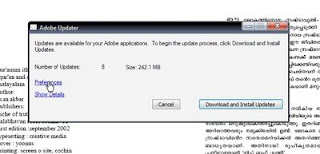
[screenshot of adobe updater]

Steps For Turning Off Adobe Updater :
* Open Acrobat Reader
* Go To Help --> Check for Updates

* Click On Preferences
* Uncheck Automatically check for Adobe updates: And Press OK
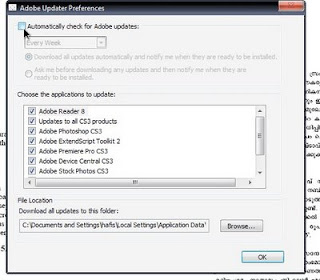
* You Are Done.
also read: How To Remove LK Advani's Ad From Your Blog
* Open Acrobat Reader
* Go To Help --> Check for Updates


* Uncheck Automatically check for Adobe updates: And Press OK

* You Are Done.
also read: How To Remove LK Advani's Ad From Your Blog
Friday, April 10, 2009
Wap Version Of Your Blog W/ Google Reader

HOW COULD I VIEW THE WAP FRIENDLY VERSION OF MY BLOG??
For Viewing Wap Friendly Version Of Your Blog Enter This Address:
http://www.google.com/reader/m/view/feed/YOUR_BLOG_FEED_ADDRESS
eg:-
http://www.google.com/reader/m/view/feed/http://feedproxy.google.com/1001tricks
screen shot of my blog on google-reader

HOW CAN I SHARE THIS LINKS WITH MY BLOG READERS??
For Sharing This Link With Your Blog Readers , Just Add This Link On Your Blog's Main Screen. So That They Could Caught It More Easly.
Also You Can Try Shortening This Link Using Online Link Shortening Tools. And Then Share It With Your Friends And Blog Readers.
Also Read: Make Wap Version Of Your Blog/Website
Saturday, March 14, 2009
Identify The Language Using Xerox Tool

Are You Finding Difficulty In Identifying Language?
Then This Tool Will Help You
* Visit Xerox Language Guesser
* Enter The Text Which You Want To Identify In The Space Provided.

Then You Will Get The Language Of The Text Which You Have Entered.
Wednesday, January 28, 2009
Make Your Own Radio Station

* Winamp (Any Version) is must.
First, things First your speed has to be at least 256/64 kbps (which means Dial-up users, will have alot of latency, just dnt bother)
Second, your going to have to have a domain, an updated one with the current i.p active. (Could be anything e.g. My sig)
Now, Your gonna have to download the Shoutcast Files.
Go to www.shoutcast.com to get the files.
Ok After downloading these, installing Both of them in any order i dnt care. Go to START>PROGRAM FILES>SHOUTcast DNAS>EDIT SHOUTCAST DNS CONFIG.
Ok your gonna have to Configure it:
Go Down and where it says password: change (that means your gonna have to change it to whatever, make sure u remember)
The Portbase: change it to whatever port you want it
Maxusers: (lets be realistic here, dnt put in 10000, like NXS's radio station) your bandwidth has to be extremely good, if your cable, 50 user max is ok, ADSL should stay below 10 users, and T1 connections should do whatever tickles there fantasy.
Open winamp, RIGHT CLICK>OPTIONS>PREFRENCES>DSP EFFECT> and choose the NULLSOFT SHOUTCAST.
Go to OUTPUT, and then click on Connection, Through the ADDRESS, type your address which you have done through www.no-ip.com, PORT NUMBER, whatever u did in the EDIT.txt, and your password.
Then go to Encoder, and choose your quality of your music. Go back to OUTPU>OUTPUT CONFIG> YELLOW PAGES. this is your advertisemant information. dow hatever you like there.
Now Connect. to check that your Radio os on-line go to http://(your address that you added in the prefrence)
Wednesday, January 7, 2009
16x Dvd+-rw Dl Dvd Writer Comparison Guide
Since the introduction of double layer DVD writers, the interest has been quite overwhelming and is why we keep bringing you reviews of these highly popular drives. The anticipation has now turned into down right obsession and it has become a key component in any current or new system build, thanks to the declining prices and continued media hype. Manufacturers are quite aware of the fascination and is why they have each been releasing their own products which excel in at least one area of the testing methodology used in most reviews. This has led to some confusion as to which drive is best suited for the individuals needs. Today, we compare four 16x double layer drives and highlight both the strong and weak points in order to give you a better idea of which drive is best suited for you.
In this comparison guide, we will be looking at four of the top 16x drives to hit the market, the Pioneer DVR-108, NEC ND3500A, Lite-On SOHW-1633s and the new LG GSA-4160B. We will cover everything from design and features to performance and price. Let's begin with a quick look at each of these drives.
As far as the front bezel design goes, the LG-GSA4160B is by far the most attractive drive of the bunch. However, for those who are looking for a headphone jack, the Lite-On drive is the only DL writer offering a headphone jack, as well as volume control. The Pioneer and NEC drives, in my opinion, are the ugliest drives, with a very plain look that just wants to make you hide the drive period. Although we only obtained the 4160B in black, all these drives are offered with both white and black bezels. If you opt for the more expensive Pioneer "XL" model, it has the most impressive looks of any drive in the market. However, this will come at a very hefty price tag, considering they contain different firmware as well that offer a few extra features.
So, we have determined which is the sexiest-looking drive, but what about performance? I've done some extensive testing on each model to determine which is indeed the most impressive of the bunch. But before we show you performance results, let's briefly look at the features and what they have to offer.
Features
Each one of these drives has there disappointments when it comes to features. Let's compare each to see what they really offer.
DVD Writing
DVD+R DVD-R DVD+RW DVD-RW
LG GSA-4160B 16x 8x 4x 4x
Lite-On SOHW-1633s 16x 8x 4x 4x
NEC ND-3500A 16x 16x 4x 4x
Pioneer DVR-108 16x 16x 4x 4x
While all these drives are indeed 16x models, only two will write to both formats at this speed. The LG GSA-4160B and the Lite-On SOHW-1633s only support 8x DVD-R writing. So if you are one who only prefers this format, the NEC or Pioneer would be the best choice. All of these drives support writing to DVD re-writable media at 4x.
DVD+R9 Double Layer Writing
Write Speed
LG GSA-4160B 2.4x
Lite-On SOHW-1633s 2.4x
NEC ND-3500A 4x
Pioneer DVR-108 4x
The major disappointment with both the LG and the Lite-On 16x drives is the lack of 4x double layer writing support. Pioneer and NEC seem to be the only manufacturers to jump in and release second generation double layer drives supporting much faster 4x writing. In fact, the jump from 2.4x to 4x is quite substantial as we will show you a bit later in this comparison.
DVD-RAM Support
Supported Read Write
LG GSA-4160B YES 5x 5x
Lite-On SOHW-1633s NO NO NO
NEC ND-3500A NO NO NO
Pioneer DVR-108 YES 2x NO
Now this is where both the LG GSA-4120B and GSA-4160B shine above the rest. In fact, it is what has made these drives the most popular DVD writers on the market. Unlike the rest in the roundup, it is a triple format burner, offering full support for DVD-RAM media. The other drives do not support it, with the exception of the Pioneer DVR-108 which supports reading of DVD-RAM discs at 2x. I personally don't see the point in offering only read capabilities, but it's at least one extra feature added to distinguish it from the rest. Fast 5x support of the LG GSA-4160 will actually be tested a bit later in this article.
CDR Writing
CDR CDRW
LG GSA-4160B 40x 24x
Lite-On SOHW-1633s 48x 24x
NEC ND-3500A 48x 24x
Pioneer DVR-108 32x 24x
The fastest CDR writers of the bunch are the Lite-On SOHW-1633s and the NEC ND-3500A. With their support for 48x writing, they make a great all-in-one drive for many users. The only drive lacking in this lineup is the Pioneer DVR-108. Why they opted for only 32x writing is still quite puzzling and is actually why I have found that many are choosing the NEC over the Pioneer. The LG GSA-4160B should not be left out of consideration though. We will show you later that the difference in write times between 40x and 48x is not much to brag about.
Bitsetting Support
One feature I've found that is most important for many users is bitsetting support. Let's compare these drives and see what they offer.
DVD+R/RW Support DVD+R DL Support
LG GSA-4160B NO NO
Lite-On SOHW-1633s YES NO
NEC ND-3500A NO YES
Pioneer DVR-108 NO YES
The LG GSA-4160B does not offer bitsetting support out of the box. However, it is very likely that you will be able to obtain support through an excellent third-party tool called DVDInfo Pro. Right now, they only support the GSA-4120B, but I'm confident with the author that support for this drive will be likely. LG firmware is very hard to hack, however some select few have been able to do so. Using Lite-On's booktype utility, you can change the booktype of DVD+R/RW media, however, the firmware does not automatically change booktype of DVD+R DL discs to DVD-ROM like the NEC and Pioneer models do.
Additional Features
As far as other features go, all these drives have a 2MB buffer but offer some sort of buffer under-run protection, which all work exceptionally well. This is especially useful if you will be burning discs at 16x, which I personally don't recommend just yet. As our individual tests of these drives revealed, burning at this speed is quite unstable, with the exception of the Lite-On SOHW-1633s.
Subscribe to:
Posts (Atom)


