
Showing posts with label Network. Show all posts
Showing posts with label Network. Show all posts
Monday, December 13, 2010
Lifehacker Explains 4G Technology
Saturday, April 3, 2010
What Is WiMax?

Sunday, May 3, 2009
Recharge Your Prepaid Account Via Internet

You Can Recharge Your Prepaid Account From The Internet . The Networks Which Supports Recharging Online Are Listed Below.
 Airtel , Vodafone , Dishtv, TataSky, Tata Indicom, Reliance Mobile , BSNL Cellone, Tatasky , Virgin mobile, Dish TV, Reliance Big tv, Airtel DTH, Sundirect , World Calling Cards and more easy recharging options.
Link: rechargetoday.com
Link: rechargetoday.com
Friday, May 1, 2009
How To Disable The Internet Gateway

If You Are Having The Problem With Your Internet Gateway , And Need To Connect To The Internet Directly Without Any Internet Gateway , Then This Post Will Help You.
[screen shot of internet gateway]
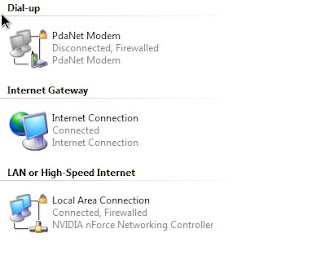
[screen shot of internet gateway]

* Start --> Control Panel --> Network Connections
* Select My Network Places From The Right Side Panel
* Click Show icons for networked UPnP devices
* Click Click Yes On The Next Screen.
* Restart Your System
also read: Turn Off Adobe Auto updater
* Select My Network Places From The Right Side Panel
* Click Show icons for networked UPnP devices
* Click Click Yes On The Next Screen.
* Restart Your System
also read: Turn Off Adobe Auto updater
Friday, February 27, 2009
Broadcast Your Live Video

Try These Websites For Broadcasting Your Videos
Rotor Blog's Top Six Broadcasting Sites
Video streaming is so in today that a lot of online services have sprung up the web recently. These video streaming services either lets you broadcast an event, your performance, and everything else that could be captured by your web camera or camera phone. And yes we mean live streaming. Here are 10 live video streaming sites that should get you on the road to web stardom.

Livecast provides a simple, convenient way of capturing and sharing events by saving videos on their web server where users can publish them to online communities, video sharing sites and blogs through one-button functionality. The site eliminates the need for uploading your video to a server, but instead let you webcast it from your mobile phone.

Justin TV offers a place to broadcast and watch video online. It became famous when its founder, Justin webcast his life 24/7. It gained a cult following among online video fans and soon Justin.tv started offering a service where anyone can share their life through videos. Justin tv streams video fboth from webcams aand mobile devices. The site offers a one-click online video broadcast for as long as you a webcam or a camcorder connected to Internet. You can also share your videos to anyone by using the “share” button on the page where your video are streaming. The site is categorized into eight channels - producers, music, social, gaming, sports, entertainment, pets, and comedy.

Qik.com is a mobile video streaming service that provides a platform for streaming high quality live video across mobile phone platform. Qik’s video streaming service is fast. Video streams are tagged at every path it takes from the moment a user click on the video streams to the video appearing on the web. Qik.com lets you stay connected with your family and friends and broadcast events and news spontaneously. It also supports MySpace, orkut and other websites including Justin.tv.

UStream.TV provides an interactive video streaming platform which lets you broadcast video using your camera and Internet connection. It features quick broadcasting tool which can be through Ustream’s server or through a user’s own website. Your viewers can interact directly with you while you are broadcasting online. As a user you can watch specific broadcasts and explore various channels on Ustream. Ustream offers broadcasts including political events, talk shows, entertainment events, music showcases, conferences, school and business events and training, sporting events and many others.

ShoZu lets you share life’s moments, be it on photos or videos on your blog. It lets you share your content to your friends and family either through email or through various social networks. In addition, ShoZu also lets you add tags and titles to your videos, read friends’ video feeds, update your status while on the move, geo-tag your videos, as well as post to your blog whereever you are.

Like ShoZu, Flixwagon lets you broadcast live videos you’re taking using your mobile phone directly online. It lets you store videos and manage them, share these videos with your friends, family and business contacts. Users can search, view and share live broadcasts and store videos on Flixwagon even if they have not uploaded any videos yet. Flixwagon is a social video platform that lets you broadcast your life.
Monday, January 19, 2009
IP Explained
IP ADDRESS STRUCTURE:
Note: the terms multicast address and MSB are explained at the end.
Every station on a PSN (packet switched network) that is based on the TCP/IP
protocol (your computer is one, for example. Yes, we're referring to a host
that is connected to the net) must have an IP address, so it can be identified,
and information can be relayed and routed to it in an orderly fashion.
An IP address consists of a 32 bit logical address. The address is divided
into two fields:
1) The network address:
Assigned by InterNIC (Internet Network Information Center).
In fact most ISPs (internet service providers) purchase a number of addresses
and assign them individually.
2) The host address:
An address that identifies the single nodes throughout the network. It can be assigned
by the network manager, by using protocols for it such as DHCP, or the workstation itself.
[The IP networking protocol is a logically routed protocol, meaning that address 192.43.54.2
will be on the same physical wire as address 192.43.54.3 (of course this is not always true. It depends on the
subnet mask of the network, but all of that can fill a text of its own)
IP address structure:
---.---.---.---
^ ^
| |
network | host
Every " --- " = 8 bits.
The first bits ===> network address
The last bits ===> host address.
with 8 bits you can present from 0-255 . (binary=(2 to the power of 8)-1)
Example:
11000010.01011010.00011111.01001010 (binary)
194.90.31.74 (decimal)
IP address CLASSES :
We can classify IP addreses to 5 groups. You can distinguish them by comparing the "High Order" bits (the first four bits on the
left of the address):
type | model | target | MSB |addr.range |bit number| max.stations|
| | groups | | |net./hosts| |
------|--------|--------|-----|--------------|----------|-------------|
A |N.h.h.h | ALL | 0 | 1.0.0.0 | 24/7 | 16,777,214 |
| | ACCEPT | | to | | |
| | HUGE | | 127.0.0.0 | | |
| | CORPS | | | | |
-----------------------------------------------------------------------
|N.N.h.h | TO ALL | 10 | 128.1.00 | 16/14 | 65,543 |
B | | LARGE | | to | | |
| | CORPS | | 191.254.00 | | |
-----------------------------------------------------------------------
|N.N.N.h |TO ALOT | 110 | 192.0.1.0 | 8/22 | 254 |
C | |OF | | to | | |
| |SMALL | | 223.225.254 | | |
| |CORPS | | | | |
-----------------------------------------------------------------------
D | NONE |MULTI-CA|1110 | 224.0.0.0 | NOT FOR | UNKNOWN |
| |ST ADDR.| | to | USUAL | |
| |RFC-1112| |239.255.255.255| USE | |
-----------------------------------------------------------------------
E | NOT FOR|EXPERIME|1,1,1,1| 240.0.0.0 |NOT FOR| NOT FOR USE|
| USE |NTAL | | to |USE | |
| |ADDR. | |254.255.255.255| | |
-----------------------------------------------------------------------
N=NETWORK , h=HOST .
Notice the address range 127.X.X.X.
These addresses are assigned to internal use to the network device, and are
used as an application tool only. For example: 127.0.0.1, the most common one,
is called the loopback address - everything sent here goes directly back to
you, without even traveling out on the wire.
Also, some IPs are reserved for VPNs - Virtual Private Networks. These are
local area networks over wide area networks that use the Internet Protocol to
communicate, and each computer inside the network is assigned with an IP
address. So, suppose a certain computer wants to send a data packet to
another host on the network with the IP 'x', but there's also another host on
the Internet that has the same IP - what happens now? So this is why you
cannot use these and other forms of reserved IPs on the Internet.
EXTRA:
Distinguishing different groups:
You have to compare the first byte on the left in the address as follows:
Type | First byte | MSB
| in decimal |
----------------------------
A | 1-127 | 0
----------------------------
B | 128-191 | 10
----------------------------
C | 192-223 | 110
----------------------------
D | 224-239 | 1110
----------------------------
E | 240-254 | 1111
----------------------------
NOTES: Yes, we know, we've left A LOT of things unexplained in this text.
With time, we will write more tutorials to cover these and other subjects. So
in the meantime, I suggest that you go to http://blacksun.box.sk, find the
tutorials page and see if there's anything else that's interesting to you.
And remember - we also have a message board, so if you have any questions,
feel free to post them there.
weird shit (newbie note):
1) Multicast: (copied from RFC 1112)
IP multicasting is the transmission of an IP datagram to a "host
group", a set of zero or more hosts identified by a single IP
destination address. A multicast datagram is delivered to all
members of its destination host group with the same "best-efforts"
reliability as regular unicast IP datagrams, i.e., the datagram is
not guaranteed to arrive intact at all members of the destination
group or in the same order relative to other datagrams.
The membership of a host group is dynamic; that is, hosts may join
and leave groups at any time. There is no restriction on the
location or number of members in a host group. A host may be a
member of more than one group at a time. A host need not be a member
of a group to send datagrams to it.
A host group may be permanent or transient. A permanent group has a
well-known, administratively assigned IP address. It is the address,
not the membership of the group, that is permanent; at any time a
permanent group may have any number of members, even zero. Those IP
multicast addresses that are not reserved for permanent groups are
available for dynamic assignment to transient groups which exist only
as long as they have members.
Internetwork forwarding of IP multicast datagrams(ip packets)is handled by
"multicast routers" which may be co-resident with, or separate from,
internet gateways. A host transmits an IP multicast datagram as a
local network multicast which reaches all immediately-neighboring
members of the destination host group. If the datagram has an IP
time-to-live greater than 1, the multicast router(s) attached to the
local network take responsibility for forwarding it towards all other
networks that have members of the destination group. On those other
member networks that are reachable within the IP time-to-live, an
attached multicast router completes delivery by transmitting the
datagram(ip packet) as a local multicast.
*if you donot understand the above do not worry, it is complicated and dry
but reread it and read it again get a dictionary if it helps.
Hacking is not easy.
2) MSB: Most Significent Bit:
In set numbers the first number on the left is the most important because it
holds the highest value as opposed to the LSB=> least significent bit, it
always holds the the smallest value.
Note: the terms multicast address and MSB are explained at the end.
Every station on a PSN (packet switched network) that is based on the TCP/IP
protocol (your computer is one, for example. Yes, we're referring to a host
that is connected to the net) must have an IP address, so it can be identified,
and information can be relayed and routed to it in an orderly fashion.
An IP address consists of a 32 bit logical address. The address is divided
into two fields:
1) The network address:
Assigned by InterNIC (Internet Network Information Center).
In fact most ISPs (internet service providers) purchase a number of addresses
and assign them individually.
2) The host address:
An address that identifies the single nodes throughout the network. It can be assigned
by the network manager, by using protocols for it such as DHCP, or the workstation itself.
[The IP networking protocol is a logically routed protocol, meaning that address 192.43.54.2
will be on the same physical wire as address 192.43.54.3 (of course this is not always true. It depends on the
subnet mask of the network, but all of that can fill a text of its own)
IP address structure:
---.---.---.---
^ ^
| |
network | host
Every " --- " = 8 bits.
The first bits ===> network address
The last bits ===> host address.
with 8 bits you can present from 0-255 . (binary=(2 to the power of 8)-1)
Example:
11000010.01011010.00011111.01001010 (binary)
194.90.31.74 (decimal)
IP address CLASSES :
We can classify IP addreses to 5 groups. You can distinguish them by comparing the "High Order" bits (the first four bits on the
left of the address):
type | model | target | MSB |addr.range |bit number| max.stations|
| | groups | | |net./hosts| |
------|--------|--------|-----|--------------|----------|-------------|
A |N.h.h.h | ALL | 0 | 1.0.0.0 | 24/7 | 16,777,214 |
| | ACCEPT | | to | | |
| | HUGE | | 127.0.0.0 | | |
| | CORPS | | | | |
-----------------------------------------------------------------------
|N.N.h.h | TO ALL | 10 | 128.1.00 | 16/14 | 65,543 |
B | | LARGE | | to | | |
| | CORPS | | 191.254.00 | | |
-----------------------------------------------------------------------
|N.N.N.h |TO ALOT | 110 | 192.0.1.0 | 8/22 | 254 |
C | |OF | | to | | |
| |SMALL | | 223.225.254 | | |
| |CORPS | | | | |
-----------------------------------------------------------------------
D | NONE |MULTI-CA|1110 | 224.0.0.0 | NOT FOR | UNKNOWN |
| |ST ADDR.| | to | USUAL | |
| |RFC-1112| |239.255.255.255| USE | |
-----------------------------------------------------------------------
E | NOT FOR|EXPERIME|1,1,1,1| 240.0.0.0 |NOT FOR| NOT FOR USE|
| USE |NTAL | | to |USE | |
| |ADDR. | |254.255.255.255| | |
-----------------------------------------------------------------------
N=NETWORK , h=HOST .
Notice the address range 127.X.X.X.
These addresses are assigned to internal use to the network device, and are
used as an application tool only. For example: 127.0.0.1, the most common one,
is called the loopback address - everything sent here goes directly back to
you, without even traveling out on the wire.
Also, some IPs are reserved for VPNs - Virtual Private Networks. These are
local area networks over wide area networks that use the Internet Protocol to
communicate, and each computer inside the network is assigned with an IP
address. So, suppose a certain computer wants to send a data packet to
another host on the network with the IP 'x', but there's also another host on
the Internet that has the same IP - what happens now? So this is why you
cannot use these and other forms of reserved IPs on the Internet.
EXTRA:
Distinguishing different groups:
You have to compare the first byte on the left in the address as follows:
Type | First byte | MSB
| in decimal |
----------------------------
A | 1-127 | 0
----------------------------
B | 128-191 | 10
----------------------------
C | 192-223 | 110
----------------------------
D | 224-239 | 1110
----------------------------
E | 240-254 | 1111
----------------------------
NOTES: Yes, we know, we've left A LOT of things unexplained in this text.
With time, we will write more tutorials to cover these and other subjects. So
in the meantime, I suggest that you go to http://blacksun.box.sk, find the
tutorials page and see if there's anything else that's interesting to you.
And remember - we also have a message board, so if you have any questions,
feel free to post them there.
weird shit (newbie note):
1) Multicast: (copied from RFC 1112)
IP multicasting is the transmission of an IP datagram to a "host
group", a set of zero or more hosts identified by a single IP
destination address. A multicast datagram is delivered to all
members of its destination host group with the same "best-efforts"
reliability as regular unicast IP datagrams, i.e., the datagram is
not guaranteed to arrive intact at all members of the destination
group or in the same order relative to other datagrams.
The membership of a host group is dynamic; that is, hosts may join
and leave groups at any time. There is no restriction on the
location or number of members in a host group. A host may be a
member of more than one group at a time. A host need not be a member
of a group to send datagrams to it.
A host group may be permanent or transient. A permanent group has a
well-known, administratively assigned IP address. It is the address,
not the membership of the group, that is permanent; at any time a
permanent group may have any number of members, even zero. Those IP
multicast addresses that are not reserved for permanent groups are
available for dynamic assignment to transient groups which exist only
as long as they have members.
Internetwork forwarding of IP multicast datagrams(ip packets)is handled by
"multicast routers" which may be co-resident with, or separate from,
internet gateways. A host transmits an IP multicast datagram as a
local network multicast which reaches all immediately-neighboring
members of the destination host group. If the datagram has an IP
time-to-live greater than 1, the multicast router(s) attached to the
local network take responsibility for forwarding it towards all other
networks that have members of the destination group. On those other
member networks that are reachable within the IP time-to-live, an
attached multicast router completes delivery by transmitting the
datagram(ip packet) as a local multicast.
*if you donot understand the above do not worry, it is complicated and dry
but reread it and read it again get a dictionary if it helps.
Hacking is not easy.
2) MSB: Most Significent Bit:
In set numbers the first number on the left is the most important because it
holds the highest value as opposed to the LSB=> least significent bit, it
always holds the the smallest value.
Friday, January 16, 2009
How To Change Your IP In Less Then 1 Minute
Purpose : Study Tutorial

1. Click on "Start" in the bottom left hand corner of screen
2. Click on "Run"
3. Type in "command" and hit ok
You should now be at an MSDOS prompt screen.
4. Type "ipconfig /release" just like that, and hit "enter"
5. Type "exit" and leave the prompt
6. Right-click on "Network Places" or "My Network Places" on your desktop.
7. Click on "properties"
You should now be on a screen with something titled "Local Area Connection", or something close to that, and, if you have a network hooked up, all of your other networks.
8. Right click on "Local Area Connection" and click "properties"
9. Double-click on the "Internet Protocol (TCP/IP)" from the list under the "General" tab
10. Click on "Use the following IP address" under the "General" tab
11. Create an IP address (It doesn't matter what it is. I just type 1 and 2 until i fill the area up).
12. Press "Tab" and it should automatically fill in the "Subnet Mask" section with default numbers.
13. Hit the "Ok" button
14. Hit the "Ok" button again
You should now be back to the "Local Area Connection" screen.
15. Right-click back on "Local Area Connection" and go to properties again.
16. Go back to the "TCP/IP" settings
17. This time, select "Obtain an IP address automatically" 1
8. Hit "Ok"
19. Hit "Ok" again
20. You now have a new IP address
With a little practice, you can easily get this process down to 15 seconds.
P.S:
This only changes your dynamic IP address, not your ISP/IP address. If you plan on hacking a website with this trick be extremely careful, because if they try a little, they can trace it back
1. Click on "Start" in the bottom left hand corner of screen
2. Click on "Run"
3. Type in "command" and hit ok
You should now be at an MSDOS prompt screen.
4. Type "ipconfig /release" just like that, and hit "enter"
5. Type "exit" and leave the prompt
6. Right-click on "Network Places" or "My Network Places" on your desktop.
7. Click on "properties"
You should now be on a screen with something titled "Local Area Connection", or something close to that, and, if you have a network hooked up, all of your other networks.
8. Right click on "Local Area Connection" and click "properties"
9. Double-click on the "Internet Protocol (TCP/IP)" from the list under the "General" tab
10. Click on "Use the following IP address" under the "General" tab
11. Create an IP address (It doesn't matter what it is. I just type 1 and 2 until i fill the area up).
12. Press "Tab" and it should automatically fill in the "Subnet Mask" section with default numbers.
13. Hit the "Ok" button
14. Hit the "Ok" button again
You should now be back to the "Local Area Connection" screen.
15. Right-click back on "Local Area Connection" and go to properties again.
16. Go back to the "TCP/IP" settings
17. This time, select "Obtain an IP address automatically" 1
8. Hit "Ok"
19. Hit "Ok" again
20. You now have a new IP address
With a little practice, you can easily get this process down to 15 seconds.
P.S:
This only changes your dynamic IP address, not your ISP/IP address. If you plan on hacking a website with this trick be extremely careful, because if they try a little, they can trace it back
Tuesday, January 13, 2009
Computer Network – Basics

LAN
LAN stands for Local Area Network. These networks evolved around the PC revolution. LANs enabled multiple users in a relatively small geographical area to exchange files and messages, as well as access shared resources such as file servers.
WAN
WAN stands for Wide Area Network. The interconnection of various LAN’s through telephone network, which unites geographically distributed users is achieved through WAN. In short when we log on to the internet, we become a part of a WAN.
MAN
MAN stands for Metropolitan Area Network. It is usually the interconnection between various LAN’s in a particular geographical area like a metropolitan city like Bombay. Hence the name.
Internetworking evolved as a solution to three key problems: isolated LANs, duplication of resources, and a lack of network management. Isolated LANS made electronic communication between different offices or departments impossible. Duplication of resources meant that the same hardware and software had to be supplied to each office or department, as did a separate support staff. This lack of network management meant that no centralized method of managing and troubleshooting networks existed.
Open Systems Interconnection Model
The OSI model is the basic model describing the data movement through a network. The Open Systems Interconnection (OSI) reference model describes how information from a software application in one computer moves through a network medium to a software application in another computer. The OSI reference model is a conceptual model composed of seven layers, each specifying particular network functions. The OSI model divides the tasks involved with moving information between networked computers into seven smaller, more manageable task groups. A task or group of tasks is then assigned to each of the seven OSI layers.
The following list details the seven layers of the Open System Interconnection (OSI) reference model:
• Layer 7—Application layer (A)
• Layer 6—Presentation layer (P)
• Layer 5—Session layer (S)
• Layer 4—Transport layer (T)
• Layer 3—Network layer (N)
• Layer 2—Data Link layer (D)
• Layer 1—Physical layer (P)
Tip To Remember
People Do Need To Send Packets Away.
The first letter of each word is related to the alphabet associated with the name of the OSI layer. P of People stands for Physical Layer of the OSI model and so on.
Protocol
The OSI model provides a conceptual framework for communication between computers, but the model itself is not a method of communication. Actual communication is made possible by using communication protocols. In the context of data networking, a protocol is a formal set of rules and conventions that governs how computers exchange information over a network medium. A protocol implements the functions of one or more of the OSI layers. A wide variety of communication protocols exist, but all tend to fall into one of the following groups: LAN protocols, WAN protocols, network protocols, and routing protocols. LAN protocols operate at the network and data link layers of the OSI model and define communication over the various LAN media. WAN protocols operate at the lowest three layers of the OSI model and define communication over the various wide-area media. Routing protocols are network-layer protocols that are responsible for path determination and traffic switching. Finally, network protocols are the various upper-layer protocols that exist in a given protocol suite.
This being the beginning session, I haven’t dwelled into the details. Lets start small and end big! So till then get these fundamentals ingrained in your mind.
Monday, January 12, 2009
Send Free Sms To India Via Email
To send sms freely, you have know the operator and the area of the service. Then, open your webmail like Gmail, Yahoo, or Rediff and send email to the MobileNo@OperatorWebsite.com and the mobile user receives it as a normal SMS, but "from" will show your email address rather than mobile number. I use Aritel AP and the messages are delivered instantly like the normal SMS. If you have to send message to an Airtel Mobile in AP just send email to MobileNo@airtelap.com.
Andhra Pradesh AirTel-----------Mobile No@airtelap.com
Andhra Pradesh Idea Cellular-----Mobile No@ideacellular.net
Chennai Skycell/Airtel------------Mobile No@airtelchennai.com
Chennai RPG Cellular-------------Mobile No@rpgmail.net
Delhi Airtel-----------------------Mobile No@airtelmail.com
Delhi Hutch-----------------------Mobile No@delhi.hutch.co.in
Gujarat Airtel---------------------Mobile No@airtelmail.com
Gujarat Idea Cellular--------------Mobile No@ideacellular.net
Gujarat Celforce/Fascel-----------Mobile No@celforce.com
Goa Airtel-------------------------Mobile No@airtelmail.com
Goa BPL Mobile-------------------Mobile No@bplmobile.com
Goa Idea Cellular------------------Mobile No@ideacellular.net
Haryana Airtel--------------------Mobile No@airtelmail.com
Haryana Escotel-------------------Mobile No@escotelmobile.com
Himachal Pradesh Airtel-----------Mobile No@airtelmail.com
Karnataka Airtel-------------------Mobile No@airtelkk.com
Kerala Airtel-----------------------Mobile No@airtelkerala.com
Kerala Escotel---------------------Mobile No@escotelmobile.com
Kerala BPL Mobile-----------------Mobile No@bplmobile.com
Kolkata Airtel----------------------Mobile No @airtelkol.com
Madhya Pradesh Airtel-------------Mobile No@airtelmail.com
Maharashtra Airtel-----------------Mobile No@airtelmail.com
Maharashtra BPL Mobile-----------Mobile No@bplmobile.com
Maharashtra Idea Cellular----------Mobile No@ideacellular.net
Mumbai Airtel----------------------Mobile No@airtelmail.com
Mumbai BPL Mobile----------------Mobile No@bplmobile.com
Punjab Airtel-----------------------Mobile No@airtelmail.com
Pondicherry BPL Mobile------------Mobile No @bplmobile.com
Tamil Nadu Airtel-------------------Mobile No@airtelmail.com
Tamil Nadu BPL Mobile-------------Mobile No@bplmobile.com
Tamil Nadu Aircel-------------------Mobile No@airsms.com
UP (West) Escotel-------------------Mobile No@escotelmobile.com
Madhya Pradesh Airtel 9893 919893xxxxxx@airtelmail.com
Maharashtra Airtel 9890 919890xxxxxx@airtelmail.com
Maharashtra BPL Mobile 9823 9823xxxxxx@bplmobile.com
Maharashtra Idea Cellular 9822 9822xxxxxx@ideacellular.net
Mumbai Airtel 9892 919892xxxxxx@airtelmail.com
Mumbai BPL Mobile 9821 9821xxxxxx@bplmobile.com
Punjab Airtel 9815 919815xxxxxx@airtelmail.com
Pondicherry BPL Mobile 9843 9843xxxxxx@bplmobile.com
Tamil Nadu Airtel 9894 919894xxxxxx@airtelmail.com
Tamil Nadu BPL Mobile 9843 919843xxxxxx@bplmobile.com
Tamil Nadu Aircel 9842 9842xxxxxx@airsms.com
Uttar Pradesh (West) Escotel 9837 9837xxxxxx@escotelmobile.com
Chennai Hutch 9884 9884012345@south.hutch.co.in
Andhra Pradesh Hutch 9885 9885012345@south.hutch.co.in
Karnataka Hutch 9886 9886012345@south.hutch.co.in
Karnataka Airtel phonenumber@airtelkk.com
MSC Code for Cellular Circle Operations
Supported Networks
Airtel: Andhra Pradesh, Madhya Pradesh, Chennai (Skycell), Delhi, Gujarat, Haryana, Himachal Pradesh, Goa, Karnataka, Kerala, Kolkata, Maharashtra, Mumbai, Punjab, Tamil Nadu, Uttar Pradesh (West)
Hutch: Delhi
Escotel: Haryana, Uttar Pradesh (West), Kerala
BPL Mobile: Mumbai, Maharashtra, Kerala, Tamil Nadu, Pondicherry, Goa
Idea Cellular: Andhra Pradesh (Tata), Maharashtra, Goa, Gujarat
RPG Cellular: Chennai
Aircel: Tamil Nadu
Celforce (Fascel): Gujarat
BSNL: You can send SMS emails to BSNL phones as mobilenumber@bsnlumN.com. The email domain is different for each region - bsnlumN.com (North), bsnlumS.com (South), bsnlumE.com (East) and bsnlumW.com (West).
Note: When I checked for the DNS records of airtelmail.com, I have seen that it has been owned by a company in Florida, USA and not by Bharthi, so I am in doubt and don't think it works. Rest are okay. Check it and post your comments.
Andhra Pradesh AirTel-----------Mobile No@airtelap.com
Andhra Pradesh Idea Cellular-----Mobile No@ideacellular.net
Chennai Skycell/Airtel------------Mobile No@airtelchennai.com
Chennai RPG Cellular-------------Mobile No@rpgmail.net
Delhi Airtel-----------------------Mobile No@airtelmail.com
Delhi Hutch-----------------------Mobile No@delhi.hutch.co.in
Gujarat Airtel---------------------Mobile No@airtelmail.com
Gujarat Idea Cellular--------------Mobile No@ideacellular.net
Gujarat Celforce/Fascel-----------Mobile No@celforce.com
Goa Airtel-------------------------Mobile No@airtelmail.com
Goa BPL Mobile-------------------Mobile No@bplmobile.com
Goa Idea Cellular------------------Mobile No@ideacellular.net
Haryana Airtel--------------------Mobile No@airtelmail.com
Haryana Escotel-------------------Mobile No@escotelmobile.com
Himachal Pradesh Airtel-----------Mobile No@airtelmail.com
Karnataka Airtel-------------------Mobile No@airtelkk.com
Kerala Airtel-----------------------Mobile No@airtelkerala.com
Kerala Escotel---------------------Mobile No@escotelmobile.com
Kerala BPL Mobile-----------------Mobile No@bplmobile.com
Kolkata Airtel----------------------Mobile No @airtelkol.com
Madhya Pradesh Airtel-------------Mobile No@airtelmail.com
Maharashtra Airtel-----------------Mobile No@airtelmail.com
Maharashtra BPL Mobile-----------Mobile No@bplmobile.com
Maharashtra Idea Cellular----------Mobile No@ideacellular.net
Mumbai Airtel----------------------Mobile No@airtelmail.com
Mumbai BPL Mobile----------------Mobile No@bplmobile.com
Punjab Airtel-----------------------Mobile No@airtelmail.com
Pondicherry BPL Mobile------------Mobile No @bplmobile.com
Tamil Nadu Airtel-------------------Mobile No@airtelmail.com
Tamil Nadu BPL Mobile-------------Mobile No@bplmobile.com
Tamil Nadu Aircel-------------------Mobile No@airsms.com
UP (West) Escotel-------------------Mobile No@escotelmobile.com
Madhya Pradesh Airtel 9893 919893xxxxxx@airtelmail.com
Maharashtra Airtel 9890 919890xxxxxx@airtelmail.com
Maharashtra BPL Mobile 9823 9823xxxxxx@bplmobile.com
Maharashtra Idea Cellular 9822 9822xxxxxx@ideacellular.net
Mumbai Airtel 9892 919892xxxxxx@airtelmail.com
Mumbai BPL Mobile 9821 9821xxxxxx@bplmobile.com
Punjab Airtel 9815 919815xxxxxx@airtelmail.com
Pondicherry BPL Mobile 9843 9843xxxxxx@bplmobile.com
Tamil Nadu Airtel 9894 919894xxxxxx@airtelmail.com
Tamil Nadu BPL Mobile 9843 919843xxxxxx@bplmobile.com
Tamil Nadu Aircel 9842 9842xxxxxx@airsms.com
Uttar Pradesh (West) Escotel 9837 9837xxxxxx@escotelmobile.com
Chennai Hutch 9884 9884012345@south.hutch.co.in
Andhra Pradesh Hutch 9885 9885012345@south.hutch.co.in
Karnataka Hutch 9886 9886012345@south.hutch.co.in
Karnataka Airtel phonenumber@airtelkk.com
MSC Code for Cellular Circle Operations
Supported Networks
Airtel: Andhra Pradesh, Madhya Pradesh, Chennai (Skycell), Delhi, Gujarat, Haryana, Himachal Pradesh, Goa, Karnataka, Kerala, Kolkata, Maharashtra, Mumbai, Punjab, Tamil Nadu, Uttar Pradesh (West)
Hutch: Delhi
Escotel: Haryana, Uttar Pradesh (West), Kerala
BPL Mobile: Mumbai, Maharashtra, Kerala, Tamil Nadu, Pondicherry, Goa
Idea Cellular: Andhra Pradesh (Tata), Maharashtra, Goa, Gujarat
RPG Cellular: Chennai
Aircel: Tamil Nadu
Celforce (Fascel): Gujarat
BSNL: You can send SMS emails to BSNL phones as mobilenumber@bsnlumN.com. The email domain is different for each region - bsnlumN.com (North), bsnlumS.com (South), bsnlumE.com (East) and bsnlumW.com (West).
Note: When I checked for the DNS records of airtelmail.com, I have seen that it has been owned by a company in Florida, USA and not by Bharthi, so I am in doubt and don't think it works. Rest are okay. Check it and post your comments.
Send Sms To Mobile Phone Via Email ( International )
SMS isn't just for sending text messages from one phone to another -- it's also a great way to get email messages on your phone.
Yes, you can get email on your phone! All you need to know is your cell phone's email address.
Most carriers have "SMS gateways" which take email messages from the Internet and deliver them to their customers' cell phones as SMS text messages. The trick is that you need to know what carrier the recipient's phone is on -- it's not enough to know their phone number. That's because the carrier determines what the email address of the receiving phone is going to be. For example, Cingular phones' address are all "something@cingularme.com" while Verizon phones are "something@vtext.com."
Sound complicated? It's not. All you really need to do is find your carrier in the list below, and then use the pattern shown there to figure out your email address. If you want to send email to a friend's phone, just ask them which carrier they use, and off you go!
(Note: For each carrier, I'll include a link to a page with more detailed information on how SMS works with that carrier, how much it costs, and where you can find more information. In the list below, just click any carrier's highlighted name to find out more.)
Alltel
[10-digit phone number]@message.alltel.com
Example: 2125551212@message.alltel.com
AT&T (formerly Cingular)
[10-digit phone number]@txt.att.net
Example: 2125551212@txt.att.net
Boost Mobile
[10-digit phone number]@myboostmobile.com
Example: 2125551212@myboostmobile.com
Nextel (now part of Sprint Nextel)
[10-digit telephone number]@messaging.nextel.com
Example: 7035551234@messaging.nextel.com
Sprint PCS (now Sprint Nextel)
[10-digit phone number]@messaging.sprintpcs.com
Example: 2125551234@messaging.sprintpcs.com
T-Mobile
[10-digit phone number]@tmomail.net
Example: 4251234567@tmomail.net
Verizon
[10-digit phone number]@vtext.com
Example: 5552223333@vtext.com
Virgin Mobile USA
[10-digit phone number]@vmobl.com
Example: 5551234567@vmobl.com
Note: If all this seems complicated, there's an easier way to send email to any phone, no matter what its carrier. Just address it to [10-digit phone number]@teleflip.com
Example: 2125551212@teleflip.com
Yes, you can get email on your phone! All you need to know is your cell phone's email address.
Most carriers have "SMS gateways" which take email messages from the Internet and deliver them to their customers' cell phones as SMS text messages. The trick is that you need to know what carrier the recipient's phone is on -- it's not enough to know their phone number. That's because the carrier determines what the email address of the receiving phone is going to be. For example, Cingular phones' address are all "something@cingularme.com" while Verizon phones are "something@vtext.com."
Sound complicated? It's not. All you really need to do is find your carrier in the list below, and then use the pattern shown there to figure out your email address. If you want to send email to a friend's phone, just ask them which carrier they use, and off you go!
(Note: For each carrier, I'll include a link to a page with more detailed information on how SMS works with that carrier, how much it costs, and where you can find more information. In the list below, just click any carrier's highlighted name to find out more.)
Alltel
[10-digit phone number]@message.alltel.com
Example: 2125551212@message.alltel.com
AT&T (formerly Cingular)
[10-digit phone number]@txt.att.net
Example: 2125551212@txt.att.net
Boost Mobile
[10-digit phone number]@myboostmobile.com
Example: 2125551212@myboostmobile.com
Nextel (now part of Sprint Nextel)
[10-digit telephone number]@messaging.nextel.com
Example: 7035551234@messaging.nextel.com
Sprint PCS (now Sprint Nextel)
[10-digit phone number]@messaging.sprintpcs.com
Example: 2125551234@messaging.sprintpcs.com
T-Mobile
[10-digit phone number]@tmomail.net
Example: 4251234567@tmomail.net
Verizon
[10-digit phone number]@vtext.com
Example: 5552223333@vtext.com
Virgin Mobile USA
[10-digit phone number]@vmobl.com
Example: 5551234567@vmobl.com
Note: If all this seems complicated, there's an easier way to send email to any phone, no matter what its carrier. Just address it to [10-digit phone number]@teleflip.com
Example: 2125551212@teleflip.com
Wednesday, January 7, 2009
8 People Can Use The Same Msn Dial Up Account
its easy really. want to have an entire family on dial-up with just one bill?
step one. purchase 20 dollar a month subscription to MSN unlimited access dial up. This will include an MSN 9 cd which you will need. With the software installed, fill up your secondary account slots with new users. Make sure you pick @msn if it gives you the choice, hotmail email addresses will not work..
say the secondary account is johnsmith@msn.com type in the Dial up connection
USER : MSN/johnsmith
PASS: ******* (whatever)
connect to your local msn phone number and the other people you gave secondary accounts to will be able to do the same, while you are connected. Its a sweet deal considering everyone is paying about 2 bucks a month for internet access, especially if you cannot get broadband. if you wanted to sell off the access to people you could actually make money doing this.. but i do not suggest it.
I used to be an msn tech and this was a little known secret even to most of the employees.
After you do this you do not need the software any more. I would suggest keeping it on to micromanage everyone else's accounts. and for the simple fact that if they don't pitch in, cut them off HEHEHE
i'm on broadband now so i dont care if i tell you my little secret. anyone else knew of this?
Subscribe to:
Posts (Atom)


